Asterisk Deployment
As ti is known, Asterisk implements a script of fisrt_boot_installer.tpl, which can be invoked using provisioning technologyor can be executed manually with a previous parameterization of the variables involved.
To get the script, launch the following command:
curl https://gitlab.com/omnileads/omlacd/-/raw/master/deploy/first_boot_installer.tpl?inline=false > first_boot_installer.sh && chmod +x first_boot_installer.sh
So, once we have the script, we go to work on the variables, removing comments and setting their values inside the script. We are going to list and explain each of these variables that should be set before running the script.
Installation Variables
oml_infras_stage: Refers to the provider infrastructureinvolved. The idea is to take advantage of the APIs of cloud providers to determine topcis like network parameters. If we are going to install onpremise or in a cloud-based platform not available in the list, assign onpremise as a value for the variable. Possible values :onpremise, aws, digitalocean, vultr, linode.
oml_acd_release: Here you should indicate which release you want to deploy.
oml_tenant_name: This variable should contain a reference name to assign to the deployment. Typically, the name of the environment/client. It is designed for CCaaS providers (Contact Center as a Service), environments where an OMniLeads instance runs for each subscriber to the service.
oml_app_host: The network address of the Linux instance hosting the OMLApp component. This is necessary to make the connection to Nginx and thus finish generating the subscription to the Websocket-Python for provisioning the configuration files (etc/asterisk).
oml_redis_host: The network address of the Linux instance hosting the Redis component. Asterisk’s dialplan relies on AGIs and queries to Redis when applying the business rules on each call.
oml_pgsql_host and oml_pgsql_port: Network address and port for establishing connections to PostgreSQL.
oml_pgsql_db, oml_pgsql_user and oml_pgsql_password: Here we quote 3 parameters, which are the name of the database that will host all the necessary tables, the user and the password allowed to access that database.
oml_ami_user and oml_ami_password: These 2 variables allow us to define the username and password that OMLApp will use to connect to the Asterisk AMI API.
oml_callrec_device: Here we should indicate to the application, the location of call recordings.
Being in a scenario where Asterisk (ACD) runs on a Linux host, while the OMLApp component is on another host, we are OBLIGED to have the recordings stored in a network device that can be accessed by OMLApp.
So we have 2 possibilities: S3 object storage or NFS.
Here we can use the concept of bucket in object storage DB or NFS. The options s3-do or s3-aws, are available to work with bucket in the cloud from DigitalOcean or AWS, respectively. While the integrator that deploy a cluster of OMniLeads I could use any other storage object that allows the bucket to be mounted on Linux using fuse-s3 (https://github.com/s3fs-fuse/s3fs-fuse), it should proceed by running an install with the local option and then adjust manually the necessary settings to get the recordings stored in that object storage.
Regarding the use of NFS to save the recordings, we can use any tool that provides NFS network storage.
Posible Values: s3-do, s3-aws, nfs.
s3_access_key, s3_secret_key, s3url and ast_bucket_name: These variables are only needed when using the storage DB object from DigitalOcean or AWS (except for s3url which is only for DigitalOcean). There you should indicate the keys to authenticate in spaces, next to the URL and the name of the bucket that will contain the recordings.
nfs_host: This variable is necessary to be assigned only when uses NFS as a storage resource for recordings.
Installation Execution
Note
When installing Asterisk as an isolated component of OMLApp, we need to make sure we are going to use some kind of network storage for recordings, since otherwise, access to recordings will be unfeasible from search view.
We should work with S3 object storage or NFS.
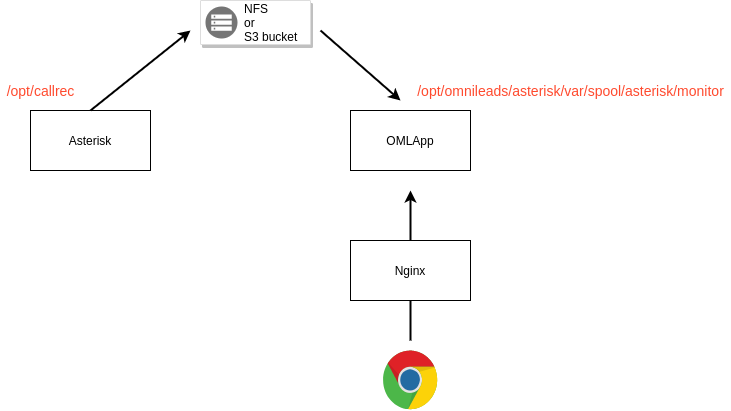
Recordings stored on resource from Asterisk and accessed from OMLApp
Finally, we can launch the script first-boot-instaler.sh. This can be done as user_data of a cloud instance, through some command line utility to manage the infrastructure, or directly copying the file to the destination Linux host and launching the execution of it.
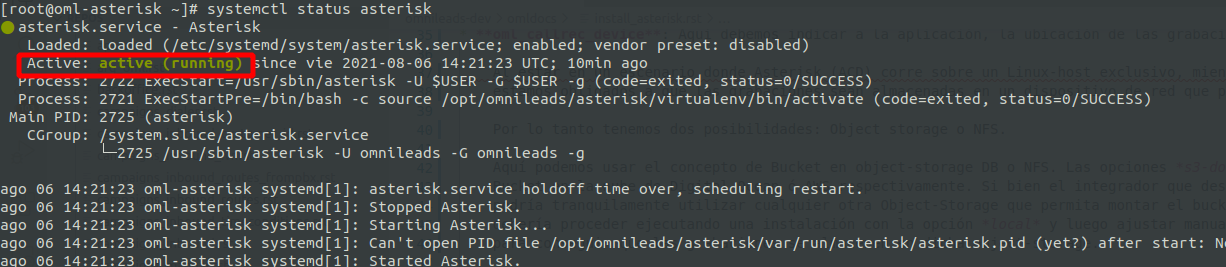
To verify that the component is operational, we should launch the following command and observe the following output:
systemctl status asterisk