PostgreSQL Deployment
As it is known, PostgreSQL implements a script fisrt_boot_installer.tpl, which can be invoked using provisioning technology or to be executed manually with a previous parameterization of the variables involved.
To get the script, launch the following command:
curl https://gitlab.com/omnileads/omlpgsql/-/raw/master/deploy/first_boot_installer.tpl?inline=false > first_boot_installer.sh && chmod +x first_boot_installer.sh
So, once we have the script, we move on to work on the variables, removing comments and setting their values inside the script. We are going to list and explain each of these variables that should be set before running the script.
Installation Variables
- oml_infras_stage: Refers to the infrastructure providerinvolved. The idea is to take advantage of the APIs of cloud providers to determine topcis like network parameters. If we are going to install onpremise or in a cloud-based platform not available in the list, assign onpremise as a value for the variable. Possible values : onpremise, aws, digitalocean, vultr, linode.
- oml_nic: Here we should indicate the network interface on which TCP port 5432 will process connection requests from Asterisk and OMLApp.
- oml_pgsql_release: Component Release to deploy.
- oml_db_name, oml_db_user, and oml_db_password: Here we quote 3 parameters, which are the name of the database that will host all the necessary tables, the user and the password allowed to access the database.
- oml_pgsql_blockdev: Here we specify the name of the disk or partition that we want to mount on the filesystem, to use as directory where PostgreSQL databases are located, that is, where the path /var/lib/pgsql will be mounted. The fact of using a device/partition here, makes sense if PostgreSQL is going to coexist with OMLApp on the same Linux host. Possible values: NULL,/dev/….
- PRIVATE_IPV4 and IPADDR_MASK: These default parameters should remain commented. They should only be enabled if for some reason, the script fails to determine IPv4 address and subnet mask through oml_nic inspection. The idea is that PGSQL opens its connections on one IPv4 and subnet.
Installation Execution
Finally, we can launch our script first-boot-instaler.sh. This can be done as user_data of a cloud instance, through some command line utility to manage the infrastructure, or directly copying the file to the destination Linux host and launching the execution of it.
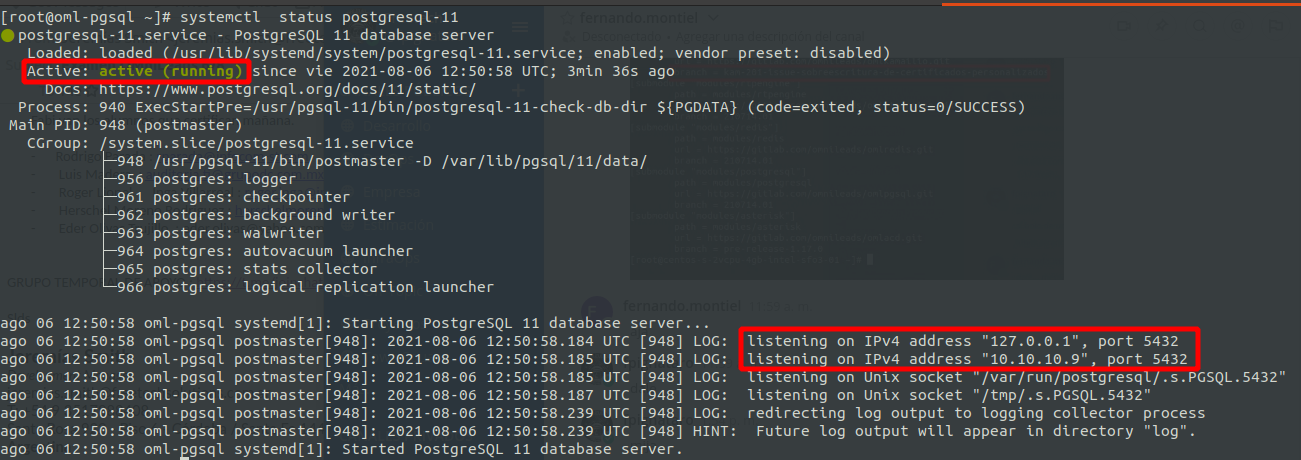
To verify that the component is operational, we should launch the following command and observe the following output:
systemctl status postgresql-11
Important
It is important to make sure that PosgteSQL opens its port (5432 by default) over a private network address! That is to say, we should NEVER install this component over a public subnet.