Redis Deployment
As it is known, Redis implements a script of fisrt_boot_installer.tpl, which can be invoked using provisioning technology or executed manually with a previous parameterization of the variables involved.
To get our script, launch the following command:
curl https://gitlab.com/omnileads/omlredis/-/raw/master/deploy/first_boot_installer.tpl?inline=false > first_boot_installer.sh && chmod +x first_boot_installer.sh
So, once we have the script, we go to work on the variables, removing comments and setting their values inside the script. We are going to list and explain each of these variables that should be set before running the script.
Installation Variables
- oml_infras_stage: Refers to the infrastructure provider involved. The idea is to take advantage of the APIs of cloud providers to determine topics like network parameters. If we are going to install onpremise or in a cloud-based platform not available in the list, assign onpremise as a value for the variable. Possible values: onpremise, aws, digitalocean, vultr, linode.
- oml_nic: Aquí debemos indicar la interfaz de red sobre la que se levanta el puerto TCP 6379 (default), que va a procesar las solicitudes de conexión a Redis provenientes de Kamailio, Asterisk, OMLApp y websockets.
- oml_redis_release: Here we indicate the release of the component that we wish to deploy.
- oml_high_load: En caso de superar los 200 agentes concurrentes, se debe indicar “true” para aplicar una serie de configuraciones que optimizan.
Con respecto a las variables implicadas para un despliegue en Alta Disponibilidad, las mismas viene comentadas por defecto. En caso de desplegar en HA, se deberan descomentar y completar.
- oml_deploy_ha: En caso de desplegar un cluster de Redis, se debe indicar true.
- oml_ha_rol: Se indica si el nodo Redis a desplegar va a ser main o replica.
- oml_master_ip: Se indica la direccion de red del nodo main del cluster Redis.
- oml_master_port: Se indica el puerto de red del nodo main del cluster Redis.
Installation Execution
Finally, we can launch the script first-boot-instaler.sh. This can be done as user_data of a cloud instance, through some command line utility to manage the infrastructure, or directly copying the file to the destination Linux host and launching the execution from it.
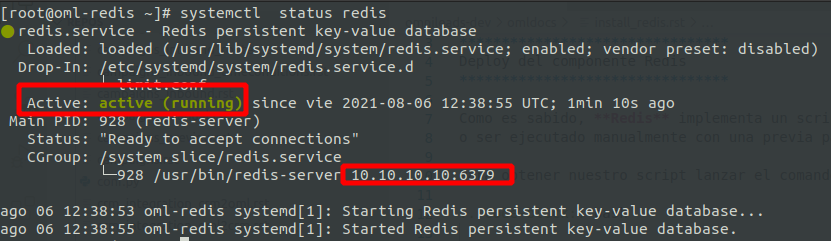
To verify that the component is operational, we should launch the following command and observe the following output:
systemctl status redis
Important
It’s important to make sure Redis opens its port (6379 by default) on a private network address! That is to say, we should NEVER install this component over a public subnet.